


Geometry Dash Extrapolation


 Hot
Hot Popular
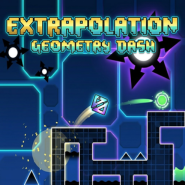
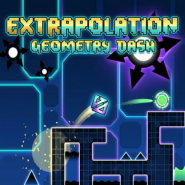
Geometry Dash Extrapolation is a popular user-created level in the Geometry Dash community. It stands out for its high-tech modern aesthetic, fast-paced rhythm, and smooth transitions that sync seamlessly with an energetic EDM soundtrack.
1. Design & Visual Features
- Modern Tech Style: Uses minimalist geometric blocks combined with glowing neon accents (green, blue, and purple) to create a futuristic digital atmosphere.
- Smooth Transitions: Vehicle mode changes (such as shifting from Cube to Ship or Wave) feature clean lighting effects and pulsing backgrounds timed to the music bass.
- Clear Visibility: Despite rich decorative elements, the layout maintains high readability, ensuring players can clearly spot spikes, portals, and jump pads.
2. How to Play (Gameplay Guide)
To master Extrapolation, you need precise timing and quick reactions across various game modes:
Beginning Phase (Cube & Ball):
- Cube Segment: Focus on precise jump orb taps and pad landings to establish the initial rhythm.
- Ball Segment: Click to flip gravity on clean neon surfaces, avoiding hidden floor and ceiling traps.
Mid-Game Speedup (Ship & Wave):
- Ship Segment: Maintain subtle hold-and-release inputs to navigate tight corridors lined with glowing spikes.
- Wave Segment: Rapid zig-zag maneuvering requiring consistent muscle memory and steady pacing.
Ending Phase (Spider & UFO):
- Spider Segment: Instantly teleport between top and bottom platforms while keeping an eye out for sudden obstacles.
- UFO Segment: Perform controlled multi-jumps to align with gravity portals right before the finish line.
3. Difficulty & Player Experience
- Difficulty Tier: Ranging from Harder to Insane depending on the specific community version.
- Skill Requirements: Requires fast reaction times, accurate music sync timing, and memorization for high-speed sections.
- Overall Feel: Delivers a highly satisfying skill test, perfect for intermediate players looking to improve before taking on Demon-tier maps.
4. Frequently Asked Questions (FAQ)
Q1: Is Geometry Dash Extrapolation an official level or a custom level?
Answer: It is a custom user-created level built using the in-game editor by the Geometry Dash community, not an official level made by RobTop.
Q2: How hard is Geometry Dash Extrapolation compared to Demon levels?
Answer: It is generally rated around the Harder to Insane difficulty range, making it easier than a Demon level but significantly more challenging than basic levels like Hard or Normal.
Q3: Can I play this level on mobile devices?
Answer: Yes, as long as you have the main Geometry Dash app installed on your Android or iOS device, you can search for and play the level smoothly.
Q4: What is the best way to practice Extrapolation?
Answer: Use the game's Practice Mode to place checkpoints at tricky transitions (especially the Wave and Ship sections) until you memorize the layout.
5. Related Games
If you enjoy Geometry Dash Extrapolation, check out these other featured games on geometry.games:
- Geometry Dash Gaminia - Experience another stylish user-created level with smooth rhythm gameplay.
- Geometry Dash Breeze - Enjoy a vibrant and fast-paced geometric platforming adventure.
- Geometry Dash Demons - Challenge yourself with the hardest Demon-tier levels in the game.
- Fingerdash - Test your skills on the classic official level featuring spider mechanics and fire rings.